
Introducing Reformat on Web (Beta) - Format Documents Directly in Your Browser
We’re excited to announce Reformat on Web - a new way to format your Word documents without needing to install the add-in.
What is Reformat on Web?
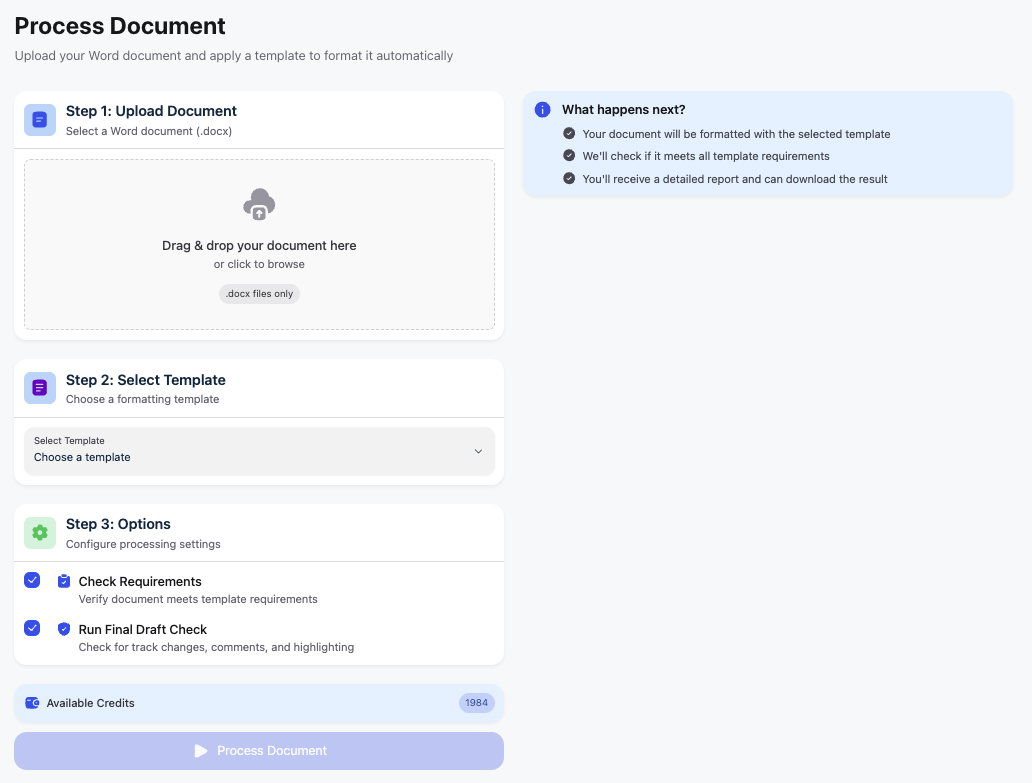
Reformat on Web lets you format documents directly from your browser. Simply upload your Word document, select a template, and download the formatted result. No installation required.
How it works:
-
Upload your
.docxfile -
Choose your formatting template
-
Configure processing options
-
Download your formatted document
How does it compare to the Word Add-in?
| Feature | Reformat on Web | Word Add-in |
|---|---|---|
| Installation | None required | Requires add-in installation |
| Where it runs | In your browser | Inside Microsoft Word |
| Workflow | Upload → Process → Download | Edit directly in document |
| Real-time editing | No | Yes |
| Preview changes | Results report after processing | Live preview before applying |
| Manual adjustments | Re-upload required | Adjust as you go |
| Best for | Quick, batch formatting | Detailed, iterative work |
| Platform | Any device with a browser | Desktop Word application |
In short: Use Reformat on Web when you need fast results without installing anything. Use the Word Add-in when you want full control and real-time editing within your document.
This is a Beta Release
We’re launching Reformat on Web in beta to gather your feedback and make improvements. During the beta period:
-
Core formatting features are fully functional
-
We’re actively improving based on user feedback
-
New features will be added over time
Try It Now
You can access Reformat on Web from your Sidebar - or use the link Reformat on Web.
We Want Your Feedback!
This is a beta release, and your feedback is invaluable in shaping how this feature develops.
Share your thoughts:
-
Open a support request if you encounter any issues
Let us know:
-
How does the web version fit into your workflow?
-
What additional features would you like to see?
-
Did you encounter any issues?
Thank you for being part of the Reformat community!