
Template Requirements are document-level checks that verify whether your document meets the structural requirements defined by the template. Unlike Template Commands (which format individual paragraphs), requirements check for the presence of document-wide elements.
Where to Find Them
After formatting completes, tap the Advanced button in the footer. Template Requirements is the first section in the Advanced panel.
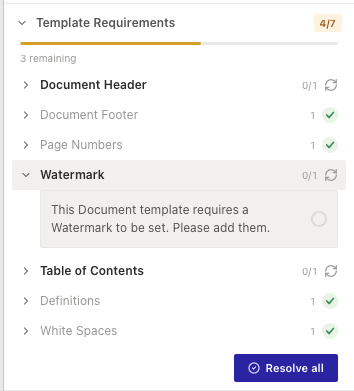
The section header shows a progress badge (e.g. “4/7”) indicating how many requirements have been met. Below the badge, a subtitle shows how many remain (e.g. “3 remaining”).
The Requirements
A template can include some or all of the following:
- Document Header — the document should have a header.
- Document Footer — the document should have a footer.
- Page Numbers — the document should include page numbers.
- Watermark — the document should have a watermark applied.
- Table of Contents — the document should contain a table of contents.
- Definitions — the document should include a definitions section.
- White Spaces — extra white space (excessive blank paragraphs) should be removed.
Not every template includes every requirement — you only see what’s configured for the selected template.
How Each Requirement Appears
Each requirement shows:
- The requirement name (e.g. “Watermark”).
- A count (e.g. “0/1” for unmet, “1” for met).
- A status icon — green tick when met, or refresh icon when unmet.
Resolving Unmet Requirements
Tap an unmet requirement to expand it. You will see:
- A description explaining what the template expects (e.g. “This Document template requires a Watermark to be set. Please add them.”).
- A checkbox — tick it to mark the requirement as resolved once you’ve addressed it in your document.
At the bottom of the section, a green Resolve all button marks all remaining unmet requirements as resolved at once.
Template Requirements do not block you from finalising. You can tap Finalise at any time, even if requirements remain unmet.